
High Availability Deployment
This document describes the Kuboard v4 High Availability (HA) production deployment: multiple Kuboard instances form a service cluster, a load balancer in front distributes traffic, and the database and Redis provide high availability and cross-instance state sharing respectively.
Intended audience
Teams that have already completed a single-node deployment (see Quick Start) and are ready to run Kuboard as a production system over the long term.
Download the Orchestration Files
The orchestration files referenced on this page can be downloaded directly:
| File | Purpose |
|---|---|
| docker-compose-ha-opengauss.yaml | The main scenario on this page: Redis Cluster (3 masters, 3 replicas) + OpenGauss + a dual-replica Nginx setup |
| docker-compose-mysql-redis.yaml | Single-replica production reference: Redis Standalone + MySQL |
Companion Files
The main scenario also needs an opengauss-init.sh in the same directory as the main compose file (the OpenGauss container init script); without it the OpenGauss container cannot initialize. Save the following as opengauss-init.sh:
#!/usr/bin/env bash
set -Eeuo pipefail

export DEBIAN_FRONTEND=noninteractive
unset LD_LIBRARY_PATH

apt-get update -qq
apt-get install -y --no-install-recommends libxml2 ca-certificates >/dev/null

cat > /usr/local/bin/gsql <<'EOF'
#!/usr/bin/env bash
export LD_LIBRARY_PATH="/usr/local/opengauss/lib:${LD_LIBRARY_PATH:-}"
exec /usr/local/opengauss/bin/gsql "$@"
EOF
chmod +x /usr/local/bin/gsqlCreate a .env in the same directory as well, with at least the image repository and version:
KUBOARD_IMAGE_REPO=swr.cn-east-2.myhuaweicloud.com/kuboard/kuboard
KUBOARD_VERSION=v4Once ready, run the following in that directory and open http://<deploy-host>:9001:
docker compose -f docker-compose-ha-opengauss.yaml up -dDeployment Topology
Kuboard v4 is a stateless Spring Boot service that scales horizontally into multiple replicas; the real cross-instance state lives in the database and Redis. The recommended topology is as follows:
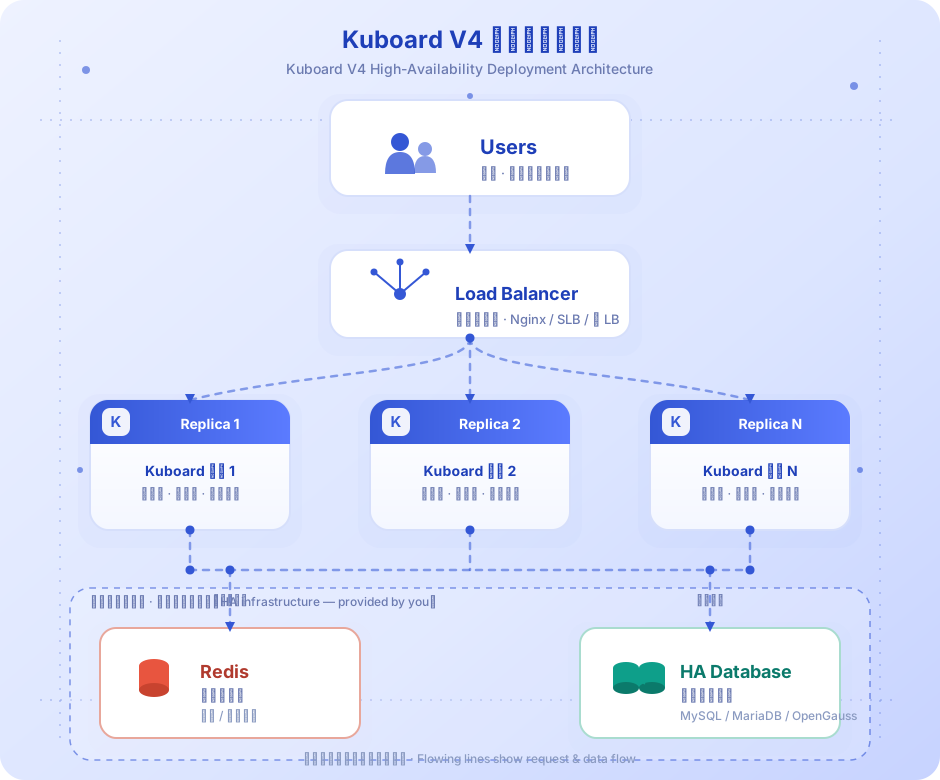
The load balancer, HA database and Redis distributed cache shown above are external infrastructure that you provide and operate yourself; Kuboard only runs the multi-replica application instances:
- Multiple Kuboard replicas: 2 or more
kuboard-servercontainers (kuboard-1/kuboard-2in the official orchestration); - A load balancer in front: Nginx or HAProxy distributes user requests to the replicas (the official orchestration uses Nginx
upstream+ reverse proxy); - A highly available database: MySQL master/slave replication, OpenGauss primary/standby, or PostgreSQL + Patroni. Kuboard points to the database HA connection address via
DB_URL; - Redis distributed cache: provides shared cache and event distribution across instances, supporting three access modes:
- Redis Standalone (single instance, good performance, no failover);
- Redis Sentinel (sentinel mode, automatic failover, described in official scenario 3);
- Redis Cluster (cluster mode, actually used by the official HA orchestration: 6 nodes, 3 masters and 3 replicas).
Port Model
- Browser access: nginx exposes host
9001→ container nginx80→ upstreamkuboard-1/kuboard-2replicas'80 - The replica containers listen on
80internally (browser entry); the Spring Boot backend port9090is not exposed - The management endpoints
9091are not exposed by default; decide when you integrate monitoring - Dependency component ports (database
5432/3306, Redis7001–7006) communicate within the orchestration only; no need to expose them to the host - Changing ports: only change nginx's
9001mapping; the replica containers keep80
The component list of the official docker-compose-ha-opengauss.yaml is as follows:
| Component | Image / Version | Role |
|---|---|---|
kuboard-1 / kuboard-2 | ${KUBOARD_IMAGE_REPO}:${KUBOARD_VERSION} | Kuboard application replicas (2) |
nginx | nginx:1.25-alpine | Load balancer, exposes 9001:80 |
db | enmotech/opengauss:5.0.1 | Database (single-node OpenGauss in the example) |
redis-node-1 ~ redis-node-6 | redis:7.2-alpine | Redis Cluster 6 nodes (3 masters + 3 replicas) |
redis-cluster-creator | redis:7.2-alpine | One-time Redis Cluster initialization |
services:
  kuboard-1:
    image: ${KUBOARD_IMAGE_REPO}:${KUBOARD_VERSION}
    environment:
      - DB_DRIVER=org.opengauss.Driver
      - DB_URL=jdbc:opengauss://db:5432/kuboard?serverTimezone=Asia/Shanghai
      - DB_USERNAME=kuboard
      - DB_PASSWORD=Kuboard@123
      - KUBOARD_CACHE_PROVIDER=redis
      - KUBOARD_CACHE_REDIS_MODE=cluster
      - KUBOARD_CACHE_REDIS_NODES=redis-node-1:7001,redis-node-2:7002,redis-node-3:7003,redis-node-4:7004,redis-node-5:7005,redis-node-6:7006
      - KUBOARD_CACHE_REDIS_PASSWORD=Kuboard123
    volumes:
      - ./docker-compose-ha-postgres-data/kuboard-1-logs:/app/logs
    depends_on:
      db:
        condition: service_healthy
      redis-cluster-creator:
        condition: service_completed_successfully
    healthcheck:
      test: ["CMD", "curl", "-f", "http://localhost:80/"]
      interval: 10s
      timeout: 5s
      retries: 5
      start_period: 60s
    networks:
kuboard_v4_ha_opengauss:Note
- The
kuboard-1/kuboard-2containers in the orchestration listen on port 80 internally (the image ships an Nginx front-end); the Spring Boot port 9090 is not exposed; KUBOARD_IMAGE_REPO/KUBOARD_VERSIONmust be provided by the deployer through environment variables;- The
KUBOARD_CACHE_*configuration of the two replicas must be exactly the same.
Why Multiple Instances Must Use KUBOARD_CACHE_PROVIDER=redis
Kuboard's cache falls into two categories: the shared cache managed by Spring CacheManager and the in-process Caffeine local cache. The cache provider is switched via kuboard.application.cache.provider (environment variable KUBOARD_CACHE_PROVIDER, default caffeine); the code auto-wires CaffeineConfig or RedisConfig based on @ConditionalOnProperty.
In single-instance (caffeine) mode, the following cross-instance state all lives in each instance's own JVM and is invisible to other replicas in a multi-replica deployment:
| State / Cache | caffeine (single node, default) | redis (distributed, required for multiple replicas) | Code basis |
|---|---|---|---|
System configuration cache (SystemConfig, KuboardUserAuthority, KuboardMenu, ClusterNameCache, etc.) | Caffeine local, ConfigCache default TTL 5 min | Shared via RedisCacheManager, default TTL 10 min | CaffeineConfig.initCacheManager() / RedisConfig.redisCacheManager() |
| MCP session info / client info (clientInfo) | Caffeine local, TTL 30 min | Redis key {kuboard:mcp}:mcp-client-info:*, TTL 24 h | CaffeineMcpSessionInfoService / RedisMcpSessionInfoService |
| MCP resource subscription (resources/subscribe) push | Only this instance's SSE subscribers receive it | Redis Pub/Sub fanout, channel {kuboard:mcp}:mcp-events:resource-change | McpResourceChangeRedisPubSub / McpResourceSubscriptionManager |
| Generic SSE event distribution | This instance only | Redis Pub/Sub, channel channel:kuboard-sse-event | MemorySsePublisher / RedisSsePublisher |
| OIDC login state (login-start and the callback may land on different instances) | Caffeine local (cross-instance callback always fails) | Redis key kuboard:oidc:state:{state}, TTL 10 min, consumed atomically with GETDEL | CaffeineOidcStateStore / RedisOidcStateStore |
| MCP per-user rate limit | Local in-memory counter | Redis INCR + EXPIRE atomic window | RateLimitFilter |
| Change approval plan / approvalToken (agent-mutation-approval) | Database is the single source of truth (SSOT), independent of the cache provider, natively supports multiple instances | Same as left | McpChangePlanRegistry |
K8sCapabilityCache (cluster capability detection cache) | Always in-process Caffeine (versionCache TTL 1h / max 500, entryCache TTL 1h / max 2000), not shared | Same as left (not shared) | K8sCapabilityCache |
ClusterClientBuilder | Always in-process Caffeine | Same as left (not shared) | CacheUtil.initSimpleCacheManager() |
The key names above carry no deployment prefix
The table lists the body of the keys / channels. Once KUBOARD_CACHE_REDIS_KEY_PREFIX is set, the actual keys carry that prefix (e.g. prod:{kuboard:mcp}:mcp-client-info:xxx), and the Pub/Sub channels do as well.
Two important conclusions follow:
- Configuration-change consistency depends on the shared cache: caches such as
SystemConfiggo through Spring CacheManager. In caffeine mode each replica keeps its own copy (stale for up to 5 minutes); in redis mode all replicas share the same Redis cache, so once any instance updates a configuration and evicts it, other replicas immediately read the new value. - Stateful session features (MCP SSE subscription push, OIDC login callback, global rate limiting) only take effect on the local instance in caffeine mode; with multiple replicas behind a load balancer you get the classic "the request landed on instance A but the state is on instance B" failure. In redis mode this is solved through Pub/Sub and shared keys.
About the MCP confirm token
The confirmToken mechanism mentioned in older versions of the documentation is deprecated in the current source code (KuboardMcpResult / McpAuditAppender only keep compatibility signatures, and McpSubscriptionScheduledCleanup no longer calls confirmToken cleanup). High-risk operation approval has been replaced by agent-mutation-approval (change approval plan). The plan and approvalToken are all persisted to the database, and approval/consumption is performed atomically with SQL-level CAS, so this mechanism guarantees consistency across multiple instances without needing Redis.
Redis Environment Variable Reference
Cache-related configuration is provided through kuboard.application.cache.*:
| Environment Variable | Default | Description |
|---|---|---|
KUBOARD_CACHE_PROVIDER | caffeine | Cache provider: caffeine (single node) / redis (distributed) |
KUBOARD_CACHE_REDIS_MODE | standalone | Redis access mode: standalone / sentinel / cluster |
KUBOARD_CACHE_REDIS_NODES | localhost:6379 | Redis node list, comma-separated (multiple nodes in cluster / sentinel mode) |
KUBOARD_CACHE_REDIS_SENTINEL_MASTER | master | Sentinel master node name (only effective in sentinel mode) |
KUBOARD_CACHE_REDIS_USERNAME | empty | Redis 6+ ACL username (common to all three modes; empty means the default user) |
KUBOARD_CACHE_REDIS_PASSWORD | empty | Redis password (common to all three modes) |
KUBOARD_CACHE_REDIS_DATABASE | 0 | Redis logical database number (only effective in standalone / sentinel mode) |
KUBOARD_CACHE_REDIS_KEY_PREFIX | empty | Deployment-level prefix for Redis keys (required when several Kuboard deployments share one Redis, e.g. prod / staging), see "Several Kuboard deployments sharing one Redis" below |
About the Redis 6+ ACL username
Redis 6 and later support multi-user ACL (AUTH <username> <password>). If the target Redis disables the default user and only allows a custom user, set the username as well:
export KUBOARD_CACHE_REDIS_USERNAME=kuboard
export KUBOARD_CACHE_REDIS_PASSWORD=Kuboard123- When the username is left empty (default), Kuboard only sends
AUTH <password>, which is equivalent to thedefaultuser — same behavior as previous releases; - The username applies to data nodes (primary / replica) in all three modes; Sentinel is not included — Kuboard does not authenticate against Sentinel (no sentinel username / password is set), so Sentinel itself must not enable
requirepass; - That user needs read / write / subscribe permissions on the key prefixes Kuboard uses (
kuboard:*,{kuboard:mcp}:*, etc.) and the related Pub/Sub channels; ifKUBOARD_CACHE_REDIS_KEY_PREFIXis set, those patterns must include the deployment prefix as well.
Behavior per mode (see RedisConfig.lettuceConnectionFactory()):
| Mode | Node selection | DATABASE | SENTINEL_MASTER | Remarks |
|---|---|---|---|---|
standalone | Only the first entry of NODES | Effective | Ignored (log warning) | Single point, no failover |
sentinel | All NODES used as sentinel addresses | Effective | Effective (specifies the master node name) | Automatic failover |
cluster | All NODES used as cluster nodes | Ignored (log warning) | Ignored (log warning) | Sharding + automatic failover |
| Any other value | — | — | — | Logs an error and refuses to start with System.exit(1) |
# Redis Standalone (single-node production, see docker-compose-mysql-redis.yaml)
export KUBOARD_CACHE_PROVIDER=redis
export KUBOARD_CACHE_REDIS_MODE=standalone
export KUBOARD_CACHE_REDIS_NODES=redis:6379
export KUBOARD_CACHE_REDIS_PASSWORD=Kuboard123

# Redis Sentinel (1 master, 1 replica, 3 sentinels)
export KUBOARD_CACHE_PROVIDER=redis
export KUBOARD_CACHE_REDIS_MODE=sentinel
export KUBOARD_CACHE_REDIS_NODES=sentinel-1:26379,sentinel-2:26379,sentinel-3:26379
export KUBOARD_CACHE_REDIS_SENTINEL_MASTER=mymaster
export KUBOARD_CACHE_REDIS_PASSWORD=Kuboard123

# Redis Cluster (3 masters, 3 replicas, see docker-compose-ha-opengauss.yaml)
export KUBOARD_CACHE_PROVIDER=redis
export KUBOARD_CACHE_REDIS_MODE=cluster
export KUBOARD_CACHE_REDIS_NODES=redis-node-1:7001,redis-node-2:7002,redis-node-3:7003,redis-node-4:7004,redis-node-5:7005,redis-node-6:7006
export KUBOARD_CACHE_REDIS_PASSWORD=Kuboard123TIP
- Follow this page for the variable name: some earlier example files write the Sentinel master variable as
KUBOARD_CACHE_REDIS_MASTER_NAME, but Kuboard actually readsKUBOARD_CACHE_REDIS_SENTINEL_MASTER. - In Redis Cluster mode, all keys and Pub/Sub channels use the hash tags
{kuboard:mcp}/{kuboard:mcp}:..., so they land on the same slot under sharded routing, keeping related keys and subscription events routed consistently.
Several Kuboard deployments sharing one Redis
Sharing one Redis among the replicas of the same deployment is the normal usage (all the scenarios above). What needs isolation is different Kuboard deployments — for example production and staging sharing one Redis, or two compose stacks on the same host.
Without isolation (the keys of both deployments are identical):
- only one deployment can hold the scheduler leader lease; the other's sync scheduling / health checks / audit table creation stop entirely;
- the menu / authority / system-config caches overwrite each other (visible as "permissions leaking between deployments");
- page events (SSE) are delivered to both deployments.
Two ways to isolate (pick one, a prefix is preferred):
environment:
  - KUBOARD_CACHE_REDIS_KEY_PREFIX=prod # only A-Z a-z 0-9 . _ - allowed
# or: - KUBOARD_CACHE_REDIS_DATABASE=3 # standalone / sentinel only, ignored in cluster mode- All replicas of the same deployment must use the same prefix (otherwise replicas cannot see each other and the leader lease splits into two);
- The prefix may only contain letters, digits,
.,_and-; a value containing a colon or braces is ignored and reported as a warning in the startup log; - When it is left empty (default), the keys are byte-for-byte identical to the ones used before: an upgrade neither clears caches, nor re-elects the leader, nor interrupts SSE subscriptions.
Switching the prefix requires a full restart: during a rolling upgrade the old and the new prefix coexist, and for up to 120 seconds (one leader lease TTL) two scheduler leaders exist. Proceed with "stop every replica → change the prefix → start them together" instead of a rolling update.
Use the prefix as a cache version: when a major upgrade changes the structure of the cached data, change the prefix to a versioned value (e.g. prod-v435); the old caches become invisible without a manual FLUSHDB. Even without changing the prefix, a cache value that cannot be deserialized is automatically evicted and reloaded from its source.
For the full configuration and troubleshooting notes, see Environment Variable Reference.
Cache Invalidation Propagation Mechanism
Kuboard's cache invalidation is handled jointly by K8sCapabilityCacheEvictNotifier (a static notification bridge) and K8sCapabilityCacheEvictListener (a Spring component). The trigger chain is as follows:
Update system config (SystemConfigService.updateSystemConfigById)
  ├─ Write to database (keep current version + up to 10 versions of history, switch the `current` flag)
  ├─ systemConfig.evict(t)                → evict the shared cache entry in CacheManager
  ├─ publishEvent(SystemConfigChangedEvent)  → McpToolsetRefresher rebuilds the toolset (local)
  └─ if the target type is ConfigClusterSync (cacheResources change):
       ├─ ConfigClusterSync.onCacheResourcesChanged()
       │    └─ K8sCapabilityCacheEvictNotifier.notifyEvictAll()   // static bridge, multiple handlers
       │         ├─ K8sCapabilityCacheEvictListener → capabilityCache.evictAll() (clear L3 source-probe cache)
       │         └─ McpNotificationToolsChangedListener → broadcast notifications/tools/list_changed to SSE subscribers
└─ Publish EnvironmentChangeEvent (injected-style config) → triggers local listeners such as dynamic thread-pool adjustmentsKey points:
- The notifier is a static bridge:
K8sCapabilityCacheEvictNotifiermaintains aCopyOnWriteArrayList; Spring components register handlers in@PostConstruct(K8sCapabilityCacheEvictListenerclears the capability cache,McpNotificationToolsChangedListenerbroadcasts to MCP), andnotifyEvictAll()runs all handlers in sequence; - Cluster CRUD also triggers invalidation:
ClusterServicecallsK8sCapabilityCacheEvictListener.notifyEvictCluster(clusterId)after importing / updating / deleting a cluster, clearing that cluster's version and entry caches; - A cacheResources change does not rebuild the context: the code deliberately does not run
contextRefresher.refresh()forConfigClusterSync(a full refresh would disconnect MCP SSE long connections); instead it publishes anEnvironmentChangeEvent, and when the key containscacheResources,K8sCapabilityCacheEvictListener.onEnvironmentChangeexecutesevictAllCapabilities().
The real cross-replica behavior
All of the events above are local events within the Spring application context; they are not forwarded to other replicas via Redis Pub/Sub. Consistency across replicas is guaranteed by two layers:
- Shared cache layer:
SystemConfigand other CacheManager caches live in Redis, so after any instance evicts them, the "next read" on every replica falls through to the database (immediately globally consistent); - Local cache layer:
K8sCapabilityCacheis always in-process Caffeine; on replica B the invalidation event only fires on the local instance. After importing a cluster on replica A, replica B's capability cache keeps serving the old value until it expires naturally via the 1-hour TTL and is re-probed.
SystemConfigService also carries a // FIXME refresh configuration in a cluster environment comment, indicating that proactive cross-replica refresh notification is not yet implemented at the code level. In production, accept the "eventual consistency within the local cache TTL" behavior (feature correctness is unaffected; there is only a short window of stale capability judgment after a change).
Database High Availability Recommendations
Kuboard accesses the database through four environment variables — DB_DRIVER / DB_URL / DB_USERNAME / DB_PASSWORD (spring.datasource) — and is itself unaware of the database HA architecture, so it can plug directly into an existing database HA solution:
- MySQL / MariaDB master/slave: configure semi-synchronous replication plus automatic failover (MHA / Orchestrator, etc.), and point
DB_URLat a virtual IP (VIP) or include multiple candidate addresses in the connection string; - OpenGauss primary/standby: the
dbservice indocker-compose-ha-opengauss.yamlis a single-node example (enmotech/opengauss:5.0.1); in production, enable OpenGauss primary/standby or use a cloud database (RDS); - PostgreSQL: Patroni + etcd forms an automatic failover cluster, and
DB_URLpoints at the Patroni VIP; - Cloud database: use the vendor's MySQL / PostgreSQL HA instance directly and let the cloud platform handle primary/standby switchover.
# The database service connection config in docker-compose-ha-opengauss.yaml (single-node example)
services:
  db:
    image: enmotech/opengauss:5.0.1
    environment:
      GS_PASSWORD: Kuboard@123
      TZ: Asia/Shanghai
    healthcheck:
      test: ["CMD-SHELL", "gsql -U kuboard -W Kuboard@123 -d kuboard -c 'SELECT 1'"]
      interval: 10s
      timeout: 5s
      retries: 10
start_period: 180sWrite patterns are master/slave friendly
Kuboard writes system configuration using the "insert a new version + current flag" approach (10 versions of history are kept), which is low-frequency, lightweight writing; cluster capability detection is read-heavy and write-light. Compared to the write amplification of the control-plane K8s, Kuboard tolerates master/slave lag fairly well, but you should still monitor master/slave delay to avoid reading a stale value from a replica right after saving a configuration.
Official HA Orchestration Examples
Redis Cluster + OpenGauss + Nginx (docker-compose-ha-opengauss.yaml)
The Redis cluster part (6 nodes, 3 masters and 3 replicas, password auth + AOF persistence):
services:
  redis-node-1:
    image: redis:7.2-alpine
    configs:
      - source: redis_node_1_conf
        target: /redis/redis.conf
    volumes:
      - ./docker-compose-ha-postgres-data/redis-node-1:/data
    command: redis-server /redis/redis.conf
    ports:
      - 7001:7001
    healthcheck:
      test: ["CMD", "redis-cli", "-p", "7001", "-a", "Kuboard123", "ping"]
      interval: 10s
      timeout: 5s
      retries: 5
      start_period: 30s
    networks:
      kuboard_v4_ha_opengauss:

  redis-cluster-creator:
    image: redis:7.2-alpine
    command: /bin/sh -c "sleep 10 && redis-cli -p 7001 -a Kuboard123 --cluster check redis-node-1:7001 >/dev/null 2>&1 && echo 'Redis cluster already exists, skipping creation' && exit 0; redis-cli -p 7001 -a Kuboard123 --cluster create redis-node-1:7001 redis-node-2:7002 redis-node-3:7003 redis-node-4:7004 redis-node-5:7005 redis-node-6:7006 --cluster-replicas 1 --cluster-yes; redis-cli -p 7001 -a Kuboard123 --cluster check redis-node-1:7001 >/dev/null 2>&1"
    depends_on:
      redis-node-1: { condition: service_healthy }
      redis-node-2: { condition: service_healthy }
      redis-node-3: { condition: service_healthy }
      redis-node-4: { condition: service_healthy }
      redis-node-5: { condition: service_healthy }
      redis-node-6: { condition: service_healthy }
    networks:
kuboard_v4_ha_opengauss:Node configuration (injected via docker config, identical for all nodes):
# redis_node_X_conf
port 7001
cluster-enabled yes
cluster-config-file nodes.conf
cluster-node-timeout 5000
appendonly yes
requirepass Kuboard123
masterauth Kuboard123The Nginx load balancer part (including the kuboard reverse proxy, IP affinity, full WebSocket path coverage, and reasonable timeouts):
# http -> upstream WS upgrade mapping
map $http_upgrade $connection_upgrade {
    default upgrade;
    '' close;
}

upstream kuboard_backend {
  # HA multi-replica: ip_hash pins the same client to a fixed upstream,
  # avoiding WebSocket / SSE long connections being round-robined across replicas.
  # Best paired with kuboard-server's P2-5a log reconnect.
  ip_hash;
  server kuboard-1:80;
  server kuboard-2:80;
}

server {
  listen 80;
  server_name localhost;

  gzip on;
  gzip_min_length 1k;
  gzip_buffers 4 16k;
  gzip_comp_level 9;
  gzip_types text/plain application/json application/javascript application/x-javascript text/css application/xml text/javascript;
  gzip_vary on;

  keepalive_timeout 65;

  # Common proxy headers (reused by every location)
  proxy_set_header Host $host;
  proxy_set_header X-Real-IP $remote_addr;
  proxy_set_header X-Forwarded-For $proxy_add_x_forwarded_for;
  proxy_set_header X-Forwarded-Proto $scheme;
  # $http_host keeps the port, so the backend can reconstruct the address users
  # actually visit; $host alone drops it. proxy_set_header also overrides any
  # client-supplied header of the same name, preventing spoofing.
  proxy_set_header X-Forwarded-Host $http_host;
  proxy_set_header X-Forwarded-Port $server_port;
  proxy_http_version 1.1;
  proxy_set_header Upgrade $http_upgrade;
  proxy_set_header Connection $connection_upgrade;
  # K8s watch / log stream / terminal / MCP SSE can all persist for hours.
  # 24h timeout covers the vast majority of use cases.
  proxy_read_timeout 86400;
  proxy_send_timeout 86400;
  client_max_body_size 10m;

  # Frontend SPA
  location / {
    proxy_pass http://kuboard_backend;
  }

  # K8s API proxy (including WebSocket watch)
  location /api/k8s.kuboard.cn/ {
    proxy_pass http://kuboard_backend;
  }
  location /k8s-api/ {
    proxy_pass http://kuboard_backend;
  }
  location /k8s-proxy/ {
    proxy_pass http://kuboard_backend;
  }

  # Terminal / log / attach / port-forward (WebSocket)
  location /k8s-ws/ {
    proxy_pass http://kuboard_backend;
  }

  # File browser HTTP streaming upload (raise the body limit and disable request buffering)
  location /k8s-upload/ {
    proxy_pass http://kuboard_backend;
    client_max_body_size 0;       # overrides the server-level 10m
    proxy_request_buffering off;  # forward as bytes arrive instead of buffering the file
  }

  # MCP server endpoints (Streamable HTTP + SSE push)
  location /mcp {
    proxy_pass http://kuboard_backend;
  }
  location /mcp/ {
    proxy_pass http://kuboard_backend;
  }
  location /mcp/message {
    proxy_pass http://kuboard_backend;
  }

  # MCP resource subscription SSE push
  location /mcp-subscriptions/ {
    proxy_pass http://kuboard_backend;
  }

  # Remaining /api/ paths
  location /api/ {
    proxy_pass http://kuboard_backend;
  }

  # Swagger / OpenAPI docs (needed when KUBOARD_SWAGGER_ENABLED=true)
  # Note: the location must NOT end with a slash, otherwise /v3/api-docs is
  # 301-redirected to /v3/api-docs/ and both the complete description and the
  # per-group paths (/v3/api-docs/{group-name}) break.
  location /v3/api-docs {
    proxy_pass http://kuboard_backend;
  }
}services:
nginx:
image: nginx:1.25-alpine
configs:
- source: nginx_conf
target: /etc/nginx/conf.d/default.conf
ports:
- "9001:80"
depends_on:
- kuboard-1
- kuboard-2
networks:
kuboard_v4_ha_opengauss:Critical configuration for the HA reverse proxy
ip_hash: a must-have for HA multi-replica. The default round-robin randomly switches WebSocket / SSE long connections between the two replicas, which causes the log stream, terminal, and MCP SSE push to disconnect repeatedly.ip_hashpins the same client to a fixed upstream so that the long connection stays on the same replica and avoids random disconnects caused by round-robin;- Full WebSocket path coverage: Kuboard's terminal uses
/k8s-ws/, K8s watch uses/k8s-api/and/api/k8s.kuboard.cn/, and MCP SSE uses/mcpand/mcp-subscriptions/. The original official orchestration only configured the WebSocket upgrade on/api/k8s.kuboard.cn/v4/clusters/, which breaks terminal and log features in HA. You must cover all paths as shown in the snippet above; - Timeouts: WebSocket long connections can last for hours, and the default 60s
proxy_read_timeout/proxy_send_timeoutwill cut the stream off. Set both to 86400s (24h) globally; - P2-5a log reconnect: in HA mode, when
ip_hashis configured, kuboard-server keeps the vast majority of WebSocket / log streams connected across a rolling restart of a replica (a client pinned to the still-alive replica does not get disconnected). If a replica still goes down (for example,ip_hashis unavailable), theK8sTerminalLogsview already implements exponential backoff reconnect (1s → 30s, capped at 8 attempts) and restores log lines produced during the outage from a Redis stream buffer (5-minute window). See Reverse Proxy and the source code comments for details.
Redis Standalone + MySQL (docker-compose-mysql-redis.yaml)
The cache configuration of the single-replica production environment, shown for comparison:
services:
  redis:
    image: redis:7.2-alpine
    command: redis-server --appendonly yes --requirepass Kuboard123
    volumes:
      - ./docker-compose-mysql-redis-data/kuboard-redis:/data
    ports:
      - 6379:6379
    healthcheck:
      test: ["CMD", "redis-cli", "-a", "Kuboard123", "ping"]
      interval: 10s
      timeout: 5s
      retries: 5
      start_period: 30s

  kuboard:
    image: ${KUBOARD_IMAGE_REPO}:${KUBOARD_VERSION}
    environment:
      - DB_DRIVER=com.mysql.cj.jdbc.Driver
      - DB_URL=jdbc:mysql://db:3306/kuboard?serverTimezone=Asia/Shanghai&useSSL=false&allowPublicKeyRetrieval=true
      - DB_USERNAME=kuboard
      - DB_PASSWORD=kuboardpwd
      - KUBOARD_CACHE_PROVIDER=redis
      - KUBOARD_CACHE_REDIS_MODE=standalone
      - KUBOARD_CACHE_REDIS_NODES=redis:6379
      - KUBOARD_CACHE_REDIS_PASSWORD=Kuboard123
    volumes:
      - ./docker-compose-mysql-redis-data/kuboard-logs:/app/logs
    ports:
- "8000:80"Failover Behavior
A Single Kuboard Instance Goes Down
- The load balancer layer (nginx upstream) round-robins by default; when an instance refuses connections (connection refused), nginx automatically forwards the request to the next upstream instance, so service is not interrupted;
- Established WebSocket / SSE long connections break; after reconnecting, clients are distributed to a live instance by the load balancer (MCP clients typically reconnect and re-initialize);
- Because the instances are stateless, the remaining instances can serve requests independently (all cross-instance state lives in the database and Redis);
- It is recommended to add
restart: alwaysto the orchestration so a downed instance is pulled back up automatically, and to wire up monitoring and alerting.
Redis Unavailable
Redis plays the role of "hard dependency with bounded degradation" in kuboard-server:
| Phase | Behavior |
|---|---|
| Startup | Fail-fast, no automatic fallback. RedisConfig.lettuceConnectionFactory establishes the connection immediately at startup; if Redis is unreachable it directly throws BeanCreationException: ... Unable to connect to Redis; when OIDC is enabled with RedisOidcStateStore, OidcStartupValidator also does a PING liveness probe that likewise fails fast. This is a deliberate design choice (operator-controllable, avoiding silent fallback to a single node) |
| Runtime | Features that depend on Redis are affected — shared cache reads/writes, cross-instance MCP SSE Pub/Sub, OIDC state, global rate limiting; features that do not depend on Redis are unaffected — change approval plan / approvalToken use the database as the single source of truth, so approval and execution keep working as long as the database is healthy |
| Recovery | Once Redis is back, instances reconnect automatically (Lettuce connection pool); if Redis takes a long time to recover, you can set KUBOARD_CACHE_PROVIDER back to caffeine and restart (note: cross-instance state such as SSE subscriptions / OIDC state / global rate limiting is briefly lost, and MCP clients may see push interruptions and need to re-establish subscriptions) |
Database Failure
- Multiple replicas cannot compensate for a database failure: all of Kuboard's business data, system configuration, and change approval plans are persisted in the database;
- During database primary/standby switchover, reads and writes that depend on the database fail until the new primary is available (the connection pool recovers automatically);
- Use a highly available database solution (see above) and run backup and restore drills for the database (see Upgrade and Backup).
Recovery Checklist
- Keep the environment variables of all replicas consistent, especially
KUBOARD_CACHE_PROVIDER/KUBOARD_CACHE_REDIS_*; - Configure
max_fails/fail_timeoutfor the nginx upstream, or switch to a load balancer with active health checks; - Monitor three things: Redis connectivity and memory, database master/slave status, and Kuboard instance health (
/actuator/health, management port defaults to 9091); - When upgrading / scaling, roll the replicas one at a time: restart one replica, confirm it is healthy, then proceed to the next (MCP sessions and SSE connections are rebuilt per instance, avoiding a complete simultaneous interruption).
Related Documentation
- Quick Start — single-node deployment
- Reverse Proxy — HTTPS and WebSocket configuration
- Upgrade — version upgrade and data backup
- Installation Index — other deployment scenarios