
Configuration Backup
Open the page under System Administration → Settings → Configuration Backup. It exports users, roles, authorization rules, system configs, cluster credentials, Helm repositories and licenses into a single snapshot file, which can be imported as-is to restore them later.
Intended for Kuboard administrators: migration, rollback after mistakes, and periodic archiving. The snapshot only covers Kuboard's own platform configuration — never the resources running inside your clusters (workloads, Services, Pods, etc.).
Opening the page
- After signing in, go to System Administration → Settings → Configuration Backup;
- Exporting requires the list permission on
config.kuboard.cn / backup, importing requires create (administrators have both by default; read-only roles can only export); - The menu item can be disabled under Settings → System Settings → Menu Settings; when disabled, the backup reminder guides you back to "Menu Settings" to restore it.
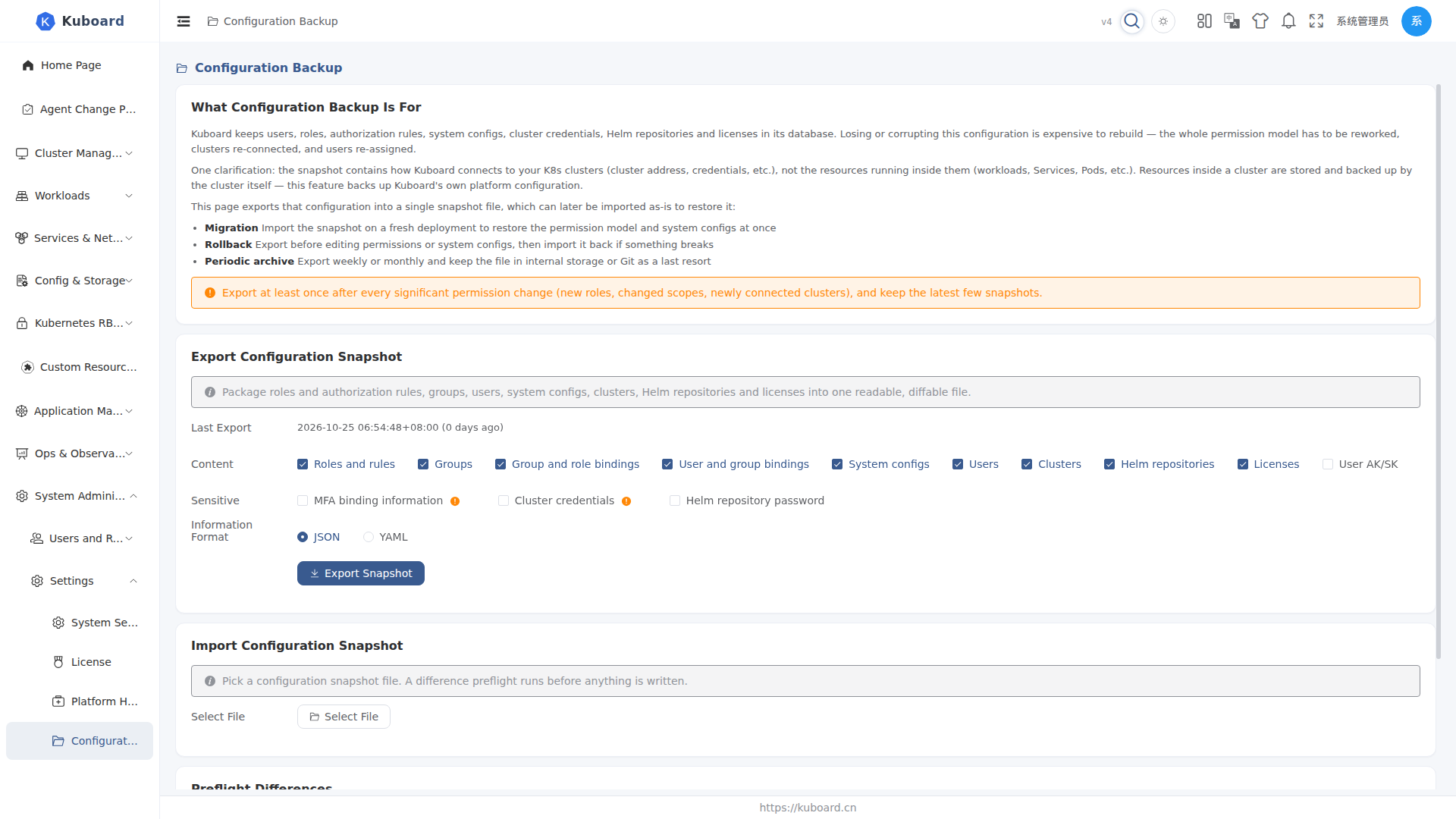
Exporting a configuration snapshot
- Check Last Export: shows the time of the most recent export and how many days ago; if none has ever been exported, a "No configuration snapshot has been exported yet" hint is shown.
- Tick the Content items: by default, Roles and rules, Groups, Group and role bindings, User and group bindings, Users, Clusters, Helm repositories, Licenses and System configs are selected; User AK/SK is off by default — enable it manually when needed.
- Tick Sensitive Information (all off by default; each option carries a warning):
- MFA binding information: includes the TOTP seed (plain text) and recovery codes — anyone holding the file can generate that user's one-time codes;
- Cluster credentials: includes the cluster kubeconfig / token (plain text);
- Helm repository password.
- Choose the Format: JSON (default) or YAML.
- Click Export Snapshot → the browser downloads a
kuboard-config-snapshot-<time>.json(or.yaml) file.
Export at least once after every significant permission change (new roles, changed scopes, newly connected clusters), and keep the latest few snapshots.
Snapshot contains no cluster resources
The snapshot contains how Kuboard connects to your K8s clusters (cluster address, credentials, etc.) — not the resources inside them. Resources inside a cluster are stored and backed up by the cluster itself.
Importing a configuration snapshot
- Click Select File and choose a snapshot file (
.json/.yaml/.ymlsupported). - Confirm Basic Information and Item Counts: the parsed file shows the snapshot time, source Kuboard version, snapshot format version and per-type item counts; data types absent from the snapshot are marked "not included", and items carrying sensitive fields get a "sensitive" tag.
- Choose the Import Mode:
- Merge: compare item by item by name — update what exists locally, create what does not (default);
- Replace: additionally delete local objects that are not present in the snapshot; requires ticking "Allow deleting extra local objects" before it runs.
- Click Preflight → lists per-item differences (create / update / unchanged / conflict / skipped / delete). Preflight writes nothing to the database.
- When there are conflicts or Replace mode is selected, confirm a second time (the items to be deleted / conflicting are listed), then click Confirm Import.
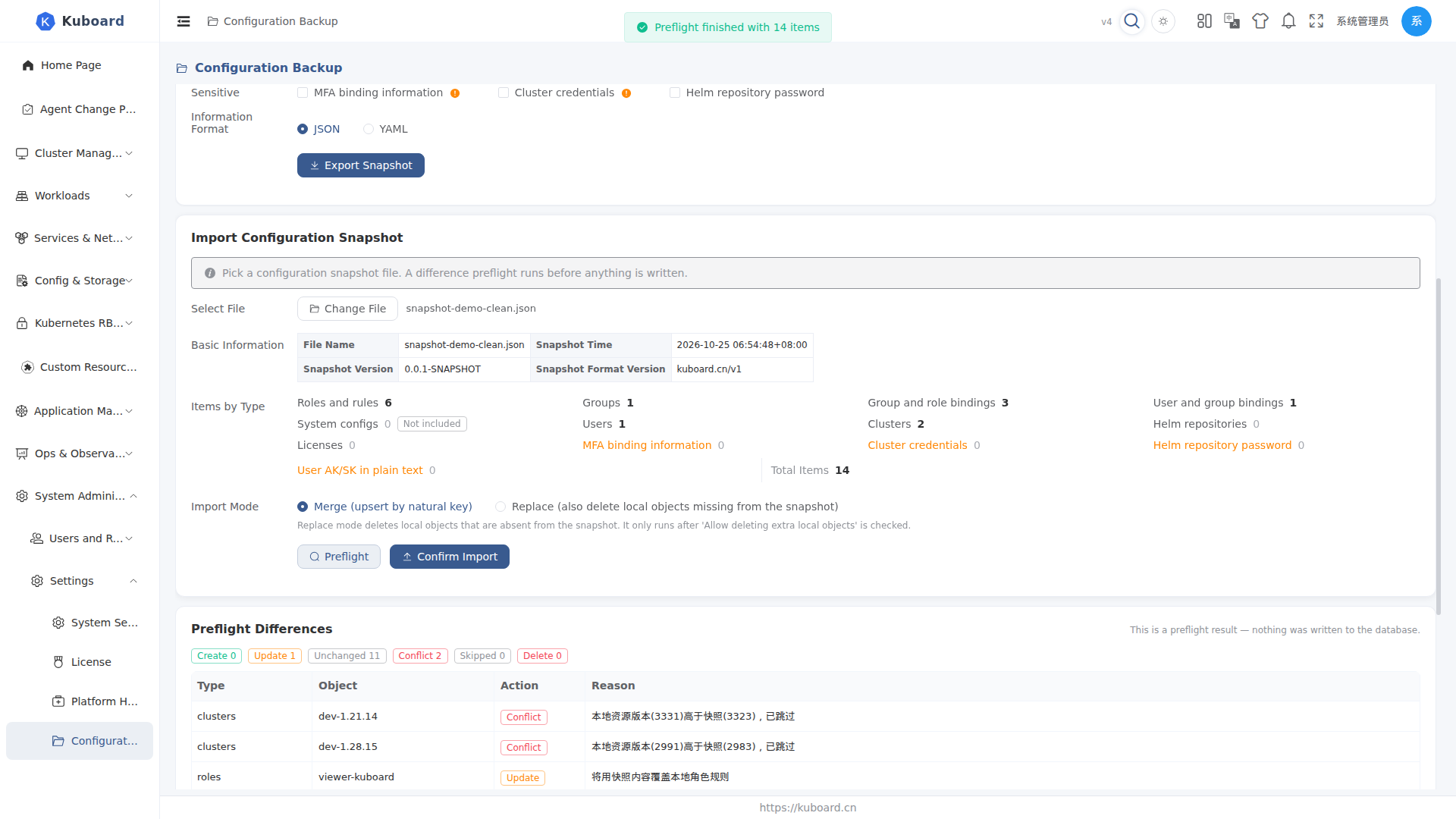
After import you see "Configuration import completed"; permission, menu, cluster and AK caches are invalidated automatically — no backend restart needed. If permissions still look stale, clear caches manually on the "Platform Health" page.
Sensitive information and security
| Item | Default | Notes |
|---|---|---|
| JWT private key, OIDC encryption key | Never exported | Generated per deployment; exporting serves no purpose |
| Login shared secret, OIDC client secret | Masked | Shown as a placeholder in the snapshot; local current value is kept on import |
| MFA binding information (TOTP seed / recovery / emergency codes) | Not exported | Requires an explicit tick; anyone holding the file can generate that user's codes |
| Cluster credentials (kubeconfig / token) | Not exported | Requires an explicit tick |
| Helm repository password | Not exported | Requires an explicit tick |
| User AK/SK | Not exported | Requires an explicit tick |
Once sensitive items are exported, keep the snapshot file safe (leaking it equals leaking credentials). Snapshots are KB-sized and can be stored in Git, cloud drives or internal storage.
Clusters need credentials re-attached
After importing a snapshot without cluster credentials, the affected clusters are left without credentials: the import report lists them, and you must re-attach kubeconfig / token under "Cluster Management" and wait for a sync round.
Backup reminders
To prevent "nobody ever thinks about backing up", Kuboard offers two reminder channels:
| Channel | Where | Trigger |
|---|---|---|
| Todo reminder (primary) | "Todos" tab in the header message center + badge | Appears when the last export is older than the reminder interval; clicking "Acknowledge" mutes it until now + the reminder interval |
| Health diagnostics finding (secondary) | "Issues" section of the Platform Health page | Reported as "Configuration has not been backed up for a long time" after the critical threshold |
The reminder policy is configured on the System Administration → Settings → System Settings → Configuration Backup tab:
| Setting | Default | Notes |
|---|---|---|
| Enable backup reminder | On | Master switch; when off, neither the todo nor the health finding is produced |
| Reminder interval (days) | 7 | Remind in the message center when the last export is older than this |
| Critical threshold (days) | 30 | The health finding escalates to "critical" after this many days without an export |
The "last export time" comes from each moment a snapshot is successfully generated on the Configuration Backup page; never having exported counts as overdue and triggers an immediate reminder.
Reminder scope
The reminder targets every user with the export permission, regardless of user source; muting affects only the current user, not other administrators.
FAQ
| Symptom | How to handle |
|---|---|
| Permissions unchanged after import | Caches are invalidated automatically; if still stale, click "Clear cache" (authorization) on the Platform Health page — the current user's menu and permissions are rebuilt immediately |
| Restored cluster missing from list / data not refreshing | If the snapshot had no cluster credentials, re-attach credentials under "Cluster Management" and wait for a sync round |
| Worried about deleting local objects | Replace mode only deletes after ticking "Allow deleting extra local objects" and confirming a second time; run a preflight first and review the "to be deleted" list |
| "Snapshot format version mismatch" on import | The snapshot format version is incompatible with the current version (validated before import); use a snapshot from the same version |
| "Configuration Backup" menu not found | It may be disabled under Menu Settings; restore it at System Administration → Settings → Menu Settings |
The interfaces used on this page belong to the config.kuboard.cn group (System Configuration APIs); see the API overview.