
Platform Health Diagnostics
Open Settings → Platform Health to see the platform gather scattered runtime facts — caches, cluster sync, License, database pool, reverse proxy — into a single-screen snapshot: when something is wrong, it states the cause and offers a one-click fix, without digging through logs or config files.
Aimed at Kuboard administrators for troubleshooting: after an upgrade, when menu or permission changes do not take effect, when list data looks stale, or when the terminal will not open — start here.
Opening the Page
- Sign in and go to Settings → Platform Health;
- The page requires list permission on
health.kuboard.cn / diagnostics(administrators have it by default); - The menu item can be disabled in Settings → System Settings → Menu Settings (it then disappears from the left menu).
The page runs top to bottom: Detected Issues → Platform → Reverse Proxy → Clusters → Cache Resources → Common Issues.
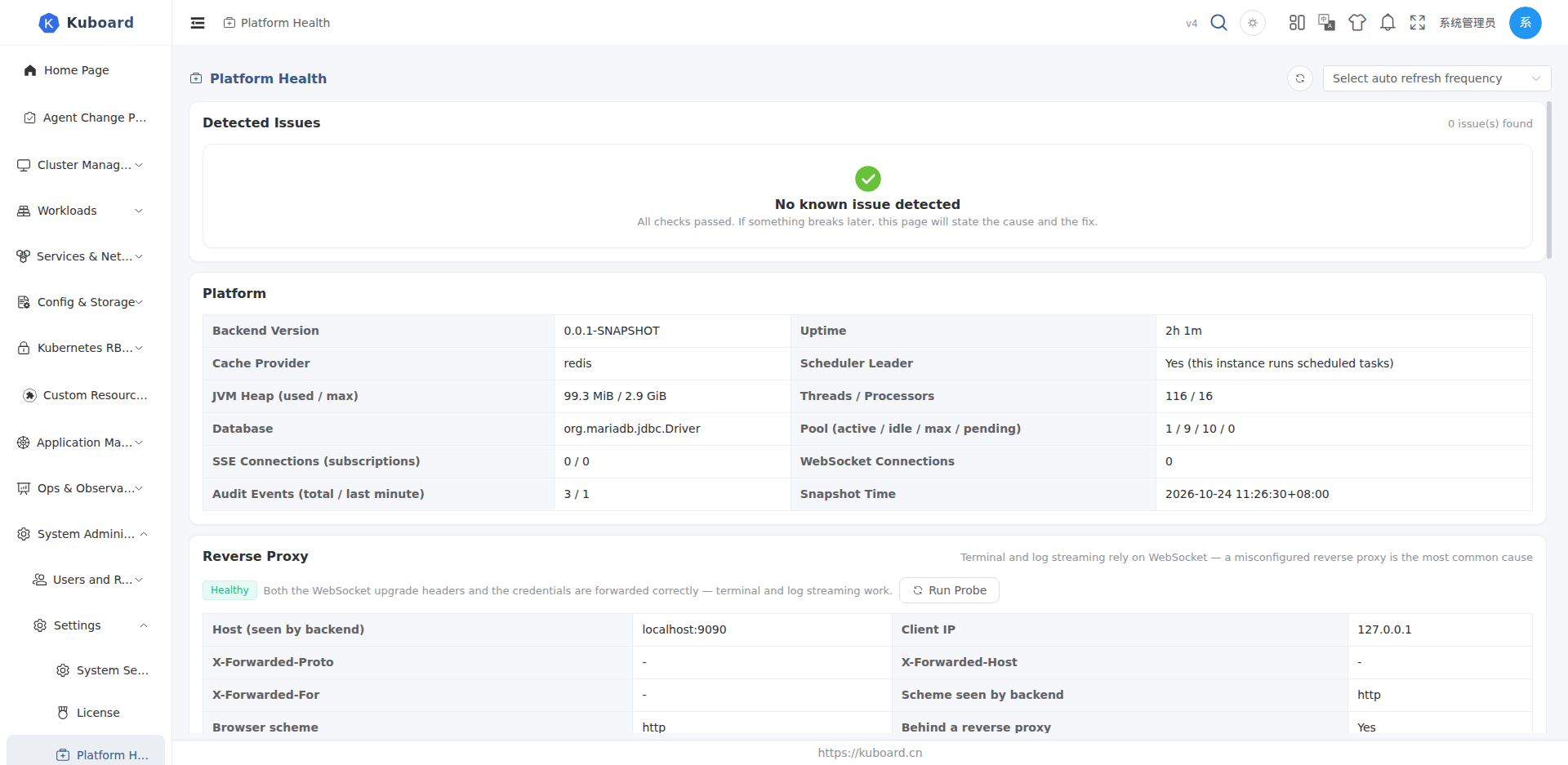
Detected Issues
The platform detects problems across the following dimensions automatically and sorts them by severity (Critical > Warning > Info):
| Dimension | Example of a detected issue |
|---|---|
| Menu cache | Menu definition changed but the cache was not refreshed; menu cache too old (more than 24 hours) |
| Authority cache | Roles / user groups changed but the authority cache was not invalidated ("permissions changed but no effect") |
| Cluster cache & sync | Unhealthy cluster cache, failed sync task, incremental sync (watch) possibly interrupted, slow full sync |
| License | Expired, expiring soon (within 30 days), or not enough cluster capacity (per-site License count + 3 free per site) |
| Database pool | Active connections near the limit, waiting threads piling up |
| Reverse proxy | WebSocket upgrade headers lost, handshake rejected, missing X-Forwarded-Proto, rewritten Host, failed browser probe |
When everything is fine, the page shows "No known issue detected".
Each issue entry shows: severity, title, evidence (time / cluster / resource involved, etc.) and a fix button. Clicking the fix button applies it immediately — no backend restart needed.
One-Click Fixes
| Action | Effect |
|---|---|
| Clear cache | Clears the menu cache or the authority cache; "Clear all caches" also clears system config, resource-type mapping and other caches |
| Restart full sync | Rebuilds the sync tasks for all cached objects of that cluster |
| Check connectivity | Verifies reachability of that cluster's apiserver (whether import parameters are correct and the network is reachable) |
Multi-instance deployments
Caches live in the single-instance local store by default, so clearing affects only the current instance; with KUBOARD_CACHE_PROVIDER=redis the cache is shared and clearing applies to all instances.
Platform
| Metric | Description |
|---|---|
| Backend version / uptime | Version number, how long since startup |
| Cache provider / scheduler leader | Cache implementation (local / redis), whether this instance is the scheduler leader |
| JVM heap / threads | Heap used and max, thread count and processor count |
| SSE / WebSocket connections | Connection counts of this instance |
| Audit writes | Total written / written in the last minute |
| Database pool | Active / idle / max / waiting |
| Snapshot time | When this snapshot was generated |
About connection counts
SSE and WebSocket connections are held by the process, so in a multi-replica deployment this page shows the numbers of the current instance; check each instance separately.
Reverse Proxy
Terminal and log streaming rely on WebSocket, and a misconfigured reverse proxy is the most common fault source. This section answers "which link of the chain is broken":
Browser probe: click Run Probe to start from your current browser and check the "browser → reverse proxy → Kuboard" chain in three steps:
| Step | What it checks |
|---|---|
| 1. Reachability | Whether the request reaches the Kuboard backend |
| 2. Upgrade forwarding | Whether the WebSocket upgrade headers (Upgrade / Connection) are forwarded |
| 3. Auth forwarding | Whether the credential (access_token) reaches the backend |
Probe conclusions: OK, Upgrade headers not forwarded, Path not routed, Auth not forwarded, or Idle timeout too short — each with the matching cause and fix hint.
Server-side observation: the backend counts occurrences and last-seen times of "upgrade headers lost" and "handshake rejected" (per instance), useful for cross-checking against proxy logs and packet captures.
See the "How to fix" section in this panel for Nginx / Ingress configuration samples.
Scope of the probe
The probe reflects the single "current browser → current proxy → Kuboard" chain; validate each entry / proxy separately in multi-ingress deployments.
Clusters
One row per cluster, showing K8s version, cache health, import status, sync issues, cached object count, last full sync and the apiserver address; the action column provides "Restart Full Sync" and "Check Connectivity".
Cache Resources
Lists each resource type's sync mode (Watch / Polling / No cache), polling interval, full/incremental sync status and watch heartbeat. Resources without cache are not auto-synced and their list data is read directly from the cluster (see Resource List Pages, "Cached vs Direct Data").
Common Issues
| Symptom | Fix |
|---|---|
| A newly installed CRD is missing under "Custom Resources" on the left | Check "Detected Issues" for an unhealthy cluster cache or sync failure, click "Restart Full Sync", then refresh |
| Role permission changes have no effect for users | Click "Clear cache" (authority) here — the current user's menu and permissions are rebuilt immediately |
| List data has not changed for a long time | "Restart Full Sync" for that cluster; run "Check Connectivity" first if the apiserver is unreachable |
| The whole platform responds slowly | Look at the pool numbers under "Platform"; when saturated, restarting full sync usually relieves it right away |
| Pod terminal will not open, logs invisible | Click "Run Probe" under "Reverse Proxy" to find the broken link, then fix the proxy configuration |
The interfaces involved in this section (health.kuboard.cn) are not listed among the existing Swagger UI groups; see the API documentation overview for access.